Claude Code desktop vs CLI: same config, different order (2026)
The desktop app and the CLI run the same engine and read the same files. On three points they resolve them in a different order, and Anthropic's own docs call one of them a departure from the CLI scope hierarchy. Read 10 September 2026.
Updated on September 10, 2026
On this page
Quick answer
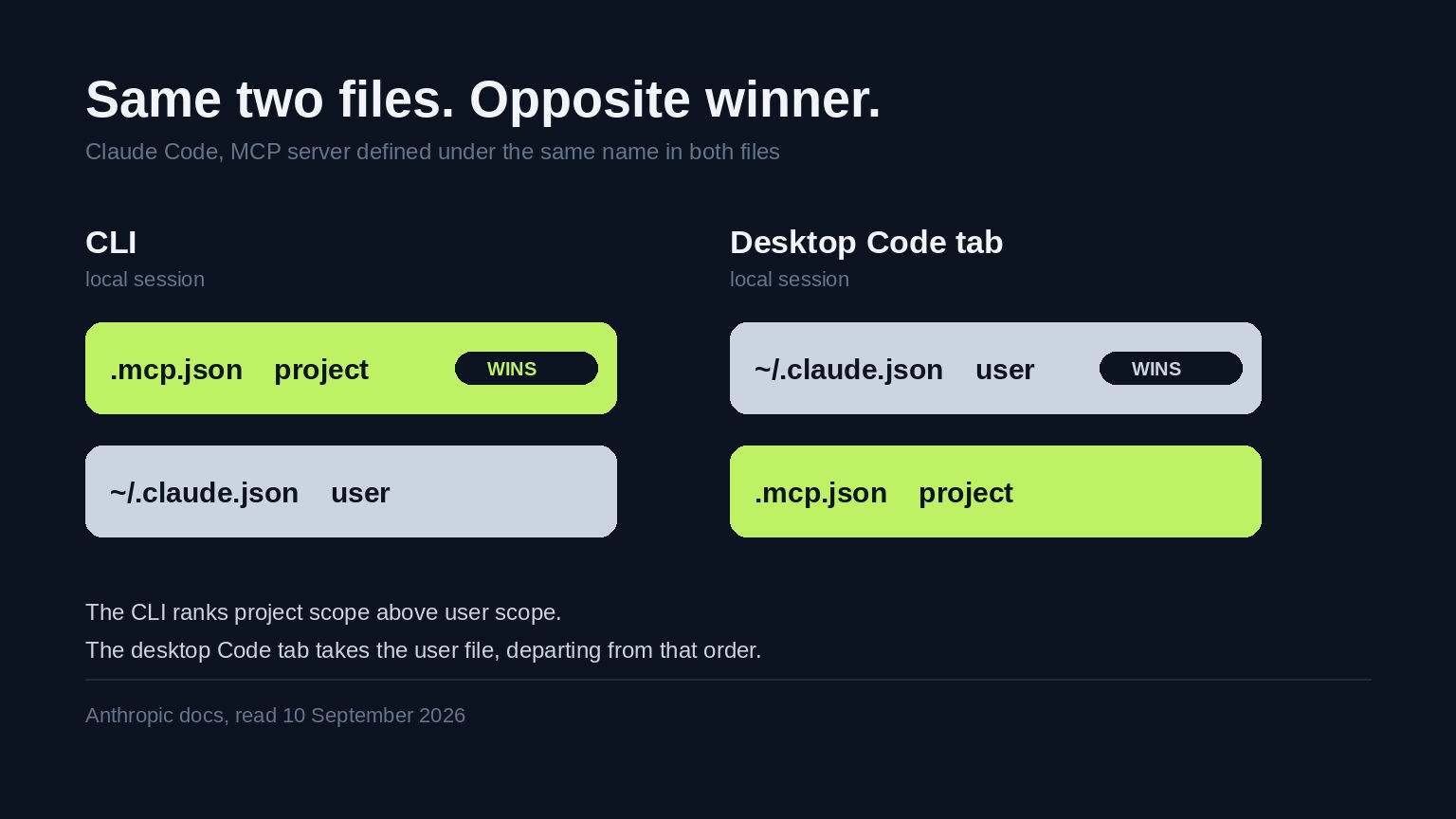
I spent 10 September 2026 trying to answer a question that sounds trivial: if I open the same repository in the Claude Code CLI and in the Claude Code desktop app, do I get the same setup. The honest answer is almost. They run the same engine and read the same configuration files, and on three specific points they resolve those files in a different order. The sharpest one is documented in Anthropic's own words as "departing from the CLI scope hierarchy": when the same MCP server name exists in both ~/.claude.json and .mcp.json, the CLI prefers the project file and the desktop Code tab prefers the user file. That is positions two and three of the vendor's published list, swapped.
The moment
A teammate said a server was "not connected" in the app. It was connected in my terminal, same repo, same machine.
We had both configured it. We had configured it in different files.
Neither of us was wrong, which is the part that took a while to accept.


Everything below is read from Anthropic's own documentation on 10 September 2026, with the version numbers it gives. I have flagged what I verified against a running install and what I did not.
First, what genuinely does carry over
It is worth being fair about this before picking at the edges, because the shared surface is large and the differences are narrow.
The desktop reference says Desktop "runs the same underlying engine with a graphical interface", that you can run both at once on the same machine and the same project, and that they share configuration and project memory. Specifically shared: CLAUDE.md and CLAUDE.local.md, MCP servers in ~/.claude.json or .mcp.json, hooks, skills, and settings in ~/.claude.json and ~/.claude/settings.json. Permission rules from settings.json apply to desktop sessions. The same models are available in both.
So this is not two products with a shared name. It is one engine with two front ends. Which is exactly why the three places they disagree are worth knowing, because you will not be looking for them.
Finding 1: the MCP scope order inverts
The MCP reference publishes the precedence list. When one server is defined in more than one place, Claude Code connects once, using the highest-precedence definition, and it uses that whole entry rather than merging fields across scopes. Highest first:
- Local scope
- Project scope
- User scope
- Plugin-provided servers
- Claude.ai connectors
Organization-managed servers via managedMcpServers rank above all five, which the page dates to Claude Code v2.1.259 or later.
Now the exception, which appears on both the desktop page and the MCP page:
"When the top level of ~/.claude.json (user scope) and .mcp.json define the same stdio server name, the Code tab uses the ~/.claude.json definition, departing from the CLI scope hierarchy."
Read those together. In the CLI, project beats user. In a local desktop Code tab session, user beats project. Same two files, same machine, opposite winner.
If the shape feels familiar, it is the one I hit tracing which model setting actually wins: a documented list, and then a second list that quietly reorders it.
That is my teammate's server. Mine came from the project file because I was in the terminal. Theirs came from their own user file because they were in the app.
Note the scope of the exception, because it is narrow and the narrowness matters: it is documented for stdio servers at the top level of ~/.claude.json, in local sessions. I would not assume it generalises to HTTP servers or to cloud sessions without testing.
Finding 2: there is a third config file, and the CLI cannot see it
The desktop app also loads MCP servers from claude_desktop_config.json, the older Claude Desktop chat app's config, into local Code tab sessions. And if the same name is defined there and in either of the other two files, claude_desktop_config.json wins.
The standalone CLI does not read that file at all.
So the full picture for a name defined everywhere, in a local desktop session, is claude_desktop_config.json, then ~/.claude.json, then .mcp.json. In the CLI it is .mcp.json, then ~/.claude.json, and the third file does not exist.
Anthropic documents the bridge rather than leaving you to copy by hand. On macOS and WSL:
claude mcp add-from-claude-desktop
That imports those servers into ~/.claude.json so the CLI can see them too.
Scroll to see more
| File | CLI | Desktop Code tab, local session |
|---|---|---|
.mcp.json (project) | highest of the three | lowest of the three |
~/.claude.json (user) | middle | middle |
claude_desktop_config.json | not read | highest |
I find this table more useful than any feature comparison, because a feature comparison tells you what each surface can do and this tells you what you will actually get.
Finding 3: permission mode is remembered per folder
The desktop app reads permissions.defaultMode from the same settings files as the CLI. But the mode you pick in the selector is remembered per folder, and it takes precedence over defaultMode for that folder.
The exception to the exception: Plan mode applies to the current session only, so it does not stick to the folder.
This is the one I would most expect to catch someone out on a shared machine, because there is no file to inspect. When I went through the permission rules themselves, the settings files told the whole story. Here they do not. You set it once in a dropdown months ago and it silently outranks the setting you are currently reading.
Finding 4: the handoff exists, with conditions
You can move a CLI session into the app by running /desktop in the terminal. Claude saves the session, opens it in the app, and exits the CLI.
The conditions are worth reading before you rely on it. It is documented for macOS and x64 Windows, when signed in with a Claude subscription. It is not available with API key authentication, nor on Amazon Bedrock, Google Cloud's Agent Platform, or Microsoft Foundry.
That last clause quietly excludes a lot of managed and enterprise setups. If you authenticate with an API key, the handoff is not there for you.
Going the other way, the "Continue in" menu can send a local session to Claude Code on the web. That one requires a clean working tree and is not available for SSH sessions.
Finding 5: what has no desktop equivalent at all
This is the list I wish I had read first, because these are absences rather than differences, and absences do not announce themselves.
Scroll to see more
| Thing | Status in Desktop |
|---|---|
--print, --output-format | Not available. Desktop is interactive only. |
--allowedTools, --disallowedTools | No per-session equivalent. Settings-file rules still apply. |
dontAsk permission mode | CLI only |
| Agent teams | CLI only. Dynamic workflows do run in Desktop. |
| Third-party providers | CLI has Bedrock, Agent Platform and Foundry. Desktop is Anthropic's API by default. |
| Inline code suggestions | Not provided in either sense. Desktop works through prompts. |
| Computer use on Linux | Not yet in the Linux beta |
There is also a category I had not anticipated: terminal-dialog commands behave differently. Commands with no argument form, such as /permissions, reply that they are not available in this environment. And /config opens the settings pane but ignores any text after it, so a command like /config theme=dark does nothing. It does not error. It just does not set the theme.
If you script anything, the first row of that table is the one that matters. The CLI reference carries the full flag list. Desktop is not a place to run automation, and the docs are direct about it: use the CLI when you need scripting.
Finding 6: what page one tells you about this
I ran the same check I run on every one of these, because I wanted to know whether I had simply failed to read the obvious.
I took the Google results for claude code desktop on 10 September 2026. Eight organic results. Two were Reddit threads that refused an anonymous client with HTTP 403, so I excluded them rather than score a blocked fetch as clean.
Here is where this differs from most of these field logs, and I want to be straight about it: Anthropic's own documentation is at positions one and two. The information is not hidden. Anyone who clicks the first result lands on the right page.
Of the four remaining readable results, the number that mention the scope hierarchy, the same-name conflict, precedence in any form, the /desktop command, dontAsk, or per-folder mode memory is zero. I scored the desktop reference itself as a control and it matched all six, so the zero is a real result and not a broken grep.
One of those four, a CLI-versus-Desktop comparison, is genuinely good and current. It reproduces the feature comparison in about nineteen rows and gets them right. It still says nothing about what happens when two files disagree.
And then the part that actually explains why this was hard, which I only found by grepping both doc pages:
desktop.mdcontains the phrase "departing from" once. It contains the phrase "project scope" zero times.mcp.mdcontains the full ordered list. It contains "departing from" zero times.
So the page that tells you a departure exists never states the order it departs from, and the page that states the order never flags the departure. Each page is correct. Neither is sufficient. You have to read both and hold them side by side, which is a thing documentation does not ask you to do and search results do not encourage.
That, rather than any missing fact, is the actual gap.
What I do now
Three things, all small.
When a server behaves differently in the app and the terminal, I stop debugging the server. I check which file each surface loaded it from. That has been the answer both times.
I moved my shared MCP servers to .mcp.json and committed it, then made sure nothing shadows those names in ~/.claude.json. A name that exists in only one file cannot resolve two ways, which sidesteps the whole finding rather than memorising it.
And I no longer treat the two surfaces as interchangeable when I write instructions for anyone else. "Add it to your MCP config" is not an instruction. It is two instructions with different outcomes.
What this does not prove
This is a documentation reading, not a behavioural test. I did not reproduce the scope inversion on a running install with a deliberately duplicated server name. Everything in Finding 1 and Finding 2 is asserted from two Anthropic pages read on 10 September 2026, and precedence is exactly the kind of thing where implementation drifts from the reference.
The exception is documented narrowly, for stdio servers at the top level of ~/.claude.json in local sessions. I have stated that boundary rather than rounding it up to "user always wins in Desktop", because I do not know that.
The version numbers cut both ways. The managed-server rule is dated to v2.1.259, which tells me this surface is still moving. The order could change again.
And the search measurement is four readable pages on one day from one machine. The two I could not fetch were both Reddit threads about desktop confusion, and one of them may well contain someone who worked this out before I did.
Postscript: my teammate's server was a filesystem MCP pointed at their home directory, in their user config, shadowing the project one pointed at the repo. It had been silently reading the wrong tree for a week.
Written by
M. PatelM. Patel writes DevMoment field notes on AI dev workflow, tested on real work rather than demos.
Frequently asked questions
Are Claude Code and Claude Desktop the same thing?
No, and the naming makes this genuinely confusing. The Claude desktop app has three tabs: Chat for conversations, Cowork for Dispatch and longer agentic work, and Code for software development. Claude Code is the coding tool, and it runs in the terminal as a CLI, in the Code tab of that desktop app, in IDEs, and on the web. Reading Anthropic's documentation on 10 September 2026, the desktop Code tab runs the same underlying engine as the CLI with a graphical interface, and you can run both at the same time on the same machine and the same project.
Do the Claude Code desktop app and the CLI share the same settings?
Mostly yes. Anthropic documents that both read CLAUDE.md and CLAUDE.local.md, MCP servers configured in ~/.claude.json or .mcp.json, hooks and skills defined in settings, and settings in ~/.claude.json and ~/.claude/settings.json. Permission rules from settings.json apply to desktop sessions too. The exceptions are about resolution order rather than about which files are read: when the same MCP server name appears in more than one file, the two surfaces can pick different definitions.
Why does an MCP server work in the Claude Code CLI but not in the desktop app?
The most likely cause is that the same server name is defined in two files and the two surfaces disagree about which wins. The CLI scope hierarchy ranks local scope first, then project scope, then user scope. But Anthropic documents that in a local desktop Code tab session, when the top level of ~/.claude.json (user scope) and .mcp.json define the same stdio server name, the Code tab uses the ~/.claude.json definition, describing this as departing from the CLI scope hierarchy. So the CLI prefers your project file and the desktop app prefers your user file. Claude Code connects once and uses that whole entry rather than merging fields across scopes.
Does the Claude Code CLI read claude_desktop_config.json?
No. Anthropic documents that the desktop app loads MCP servers from claude_desktop_config.json into local Code tab sessions, alongside servers from ~/.claude.json and .mcp.json, and that a server defined there wins if the same name is also defined in either of the others. The standalone CLI does not read that file at all. On macOS and WSL you can run claude mcp add-from-claude-desktop to import those servers into ~/.claude.json so the CLI can see them.
Can I move a Claude Code session from the terminal to the desktop app?
Yes, by running the /desktop command in the terminal. Claude saves the session, opens it in the desktop app, and exits the CLI. As documented on 10 September 2026 this works on macOS and x64 Windows when you are signed in with a Claude subscription, and it is not available with API key authentication or on Amazon Bedrock, Google Cloud's Agent Platform, or Microsoft Foundry. Going the other way, the Continue in menu can send a local session to Claude Code on the web, which requires a clean working tree and is not available for SSH sessions.
What can the Claude Code CLI do that the desktop app cannot?
Anthropic lists several. Scripting and automation via --print and --output-format are not available in Desktop, which is interactive only. There is no per-session equivalent of --allowedTools or --disallowedTools, though permission rules in settings files still apply. The dontAsk permission mode and agent teams are CLI only, while dynamic workflows do run in Desktop. Third-party providers such as Amazon Bedrock, Google Cloud's Agent Platform and Microsoft Foundry are the CLI's strength, with Desktop using Anthropic's API by default. Terminal-dialog commands also behave differently: /permissions replies that it is not available in that environment, and /config opens the settings pane but ignores any text after it.
Keep reading
Claude Code model: which setting actually wins (2026)
I went looking for which model was answering me and found three separate precedence orders, fourteen documented inputs, and two environment variables that resolve in opposite directions. Read from Anthropic's own docs on 9 September 2026, with the version numbers.

The MCP Servers I Actually Keep Loaded in Claude Code (2026 Field Reference)
A working reference: the five MCP servers I keep loaded in Claude Code after a year of daily use, the ones I removed, why every server costs context-window tokens, and the exact scope config that keeps the list short.

Claude Code Permissions: The settings.json I Actually Run (2026 Field Log)
The three arrays, the precedence rule nobody explains, the two gotchas that cost me an afternoon, and the exact settings.json allow, ask, and deny block I run now.